
Before You Start: Tools and Mounting Types
You just bought a fish finder and you’re staring at the box, wondering where to drill holes. Everyone does. The good news: installing a fish finder is a weekend job you can handle with basic tools and a little patience. The bad news: most problems people blame on the unit actually come from poor installation.
This guide walks through the whole process—choosing a mount, aligning the transducer, routing cables, wiring power, and fixing the common mistakes that cause blank screens or unstable readings. You’ll finish with a setup that works at idle and at 30 mph, not just one that looks tidy in the driveway.

WINDFRD
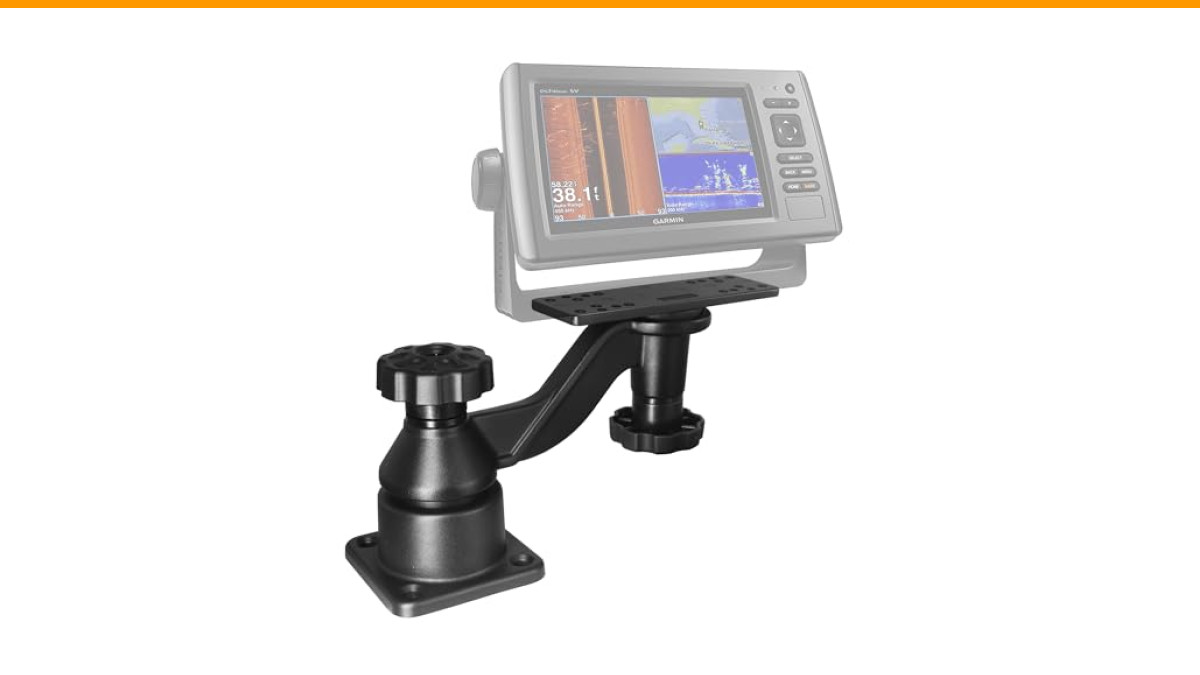
WINDFRD Aluminum Swing Arm Fish Finder Mount for 5"-12" Screens | Horizontal swing arm mount for chartplotters. Fits 5-12" screens. Compatible with Garmin Lowrance Humminbird
- Heavy Duty - Extra strong load-bearing marine electronic mount is made of all aluminium and can hold up to 110 lbs. static and 22…
- Designed for High Salt Marine Environment - Constructed of Powder-Coated Marine-Grade Aluminum and Stainless Steel Hardware. The m…
- Superior Compatibility - Heavy-duty mounting base down-drilled to mount on any flat surface, such as the dashboards, decks of boat…
Before touching any hardware, pick your transducer mount style. This decision drives everything else.
- Transom mount—The most common choice for aluminum fishing boats and small fiberglass runabouts. The bracket bolts to the boat’s transom, and the transducer sits in the water behind the hull. It’s easy to install and adjust, but it can create drag and is vulnerable to impact if you beach the boat.
- Thru-hull mount—A hole is cut through the hull, and the transducer is mounted flush with the bottom. Ideal for fiberglass boats that plane at high speed, because it reads cleanly without turbulence. Installation is permanent and takes more skill—you must drill a precise hole and seal it properly.
- Trolling motor mount—The transducer attaches to the trolling motor shaft or head. Great for kayaks and bass boats where you want the reading right at the front. Cable management is simpler, but you lose the reading when the motor is stowed.
- In-hull mount—The transducer sits inside the hull, shooting through solid fiberglass (never aluminum). No holes below the waterline, but you sacrifice some clarity and can’t use it on cored hulls.
If your boat has an aluminum hull, stick with transom or trolling motor mounts. Thru-hull and in-hull don’t work because the metal blocks sonar. For fiberglass boats over 20 feet, thru-hull gives the best high-speed performance.
One more thing: if you’re mounting a larger display unit, consider a sturdy mounting arm like the WINDFRD Aluminum Swing Arm Fish Finder Mount. It’s built for 5- to 12-inch screens and holds up to 110 lbs. static, so your 10-inch chartplotter won’t wobble when the waves kick up. The powder-coated aluminum and stainless steel hardware handle saltwater corrosion, and the 360-degree pivot makes it easy to angle the screen toward the sun.
Step 1: Choosing the Perfect Location for the Display Unit and Transducer
Where you place the display matters more than you think. It needs to be visible without blocking your view of the water or the GPS. On a console boat, mount it high on the dash, slightly angled toward the helm. On a tiller boat, put it near the tiller handle so you can glance at it while steering.
For the transducer, the transom is the default. But not every spot on the transom works. The transducer must sit in clean water—away from strakes, rivets, through-hull fittings, and the propeller wash. A common mistake is mounting it too close to the centerline, where the hull’s running strake creates bubbles. Move it at least 10 inches to one side of the propeller, and keep it clear of any step or ridge on the hull.
If your boat has a stepped hull (common on bass boats), mount the transducer on the first step, not the second. The water flow is cleaner there. On aluminum boats with rivets, place the transducer between two rivet lines, but make sure the mounting bracket doesn’t sit on a rivet head—it won’t sit flat.
Before drilling anything, hold the transducer in place and look at the hull from behind. The transducer face should be parallel to the waterline when the boat is at rest. You’ll adjust the angle later, but start level.
Step 2: Installing the Transducer
Mounting the Bracket
Transom brackets come in two styles: fixed and adjustable. Fixed brackets are simple—bolt to the transom, then slide the transducer into the bracket. Adjustable brackets let you tilt the transducer up if you hit an obstruction, which is handy for trailer launch ramps.
To mount the bracket, hold it against the transom and mark the screw holes with a pencil. Use a level to ensure the bracket is vertical—if it’s tilted, the transducer will point sideways and you’ll get poor readings.
Drill pilot holes with a 3/16-inch bit for the included screws. If your transom is cored (some fiberglass boats have balsa or foam cores), fill the holes with marine sealant before inserting the screws. This prevents water from seeping into the core, which can cause rot over time. Coat the screw threads with the same sealant to keep water out.
Hand-tighten the screws, then snug them with a wrench. Don’t over-tighten—stripping the fiberglass is easy, and you’ll have to move the bracket.
Aligning the Transducer for High-Speed Performance
This is where most DIY installs go wrong. The transducer face must be slightly angled downward at the rear—about 2 to 4 degrees—so it stays in the water when the boat planes. If it sits flat, the bow lifts and the transducer comes out of the water, causing the screen to lose the bottom at speed.
Here’s the trick: set the bracket so the transducer’s rear edge sits about 1/8 inch lower than the front edge. That’s enough. Too much angle and you’ll get excessive drag and possible spray. Too little and you’ll lose bottom reading.
After mounting, test it at speed. If the bottom drops out above 20 mph, adjust the bracket down slightly. If you see spray or the boat feels sluggish, adjust it up. This trial-and-error is normal—expect to fiddle with it on the water.
Step 3: Routing and Securing the Transducer Cable
The transducer cable is the lifeline of your fish finder. A kink or cut in the cable kills the sonar signal. Route it from the transducer up the transom, then forward to the display unit.
Avoid running the cable near the engine’s power cables or the steering cables. The electrical noise from the alternator can create interference, showing up as random dots or vertical lines on the screen. If you must cross a power cable, do it at a 90-degree angle. Keep the transducer cable at least 18 inches away from any other wiring.
Avoiding Interference and Water Leaks
To get the cable up the transom, use a cable grommet or a plastic conduit. Drill a 1/2-inch hole through the transom, push the grommet in, and feed the cable through. Then seal the grommet with marine sealant. Don’t rely on the grommet alone—it can crack over time.
Inside the boat, run the cable along the gunwale or through a rigging tube if you have one. Rigging tubes are the plastic conduits that carry steering cables and wiring from the transom to the console. Fish the transducer cable through the tube using a wire puller or a piece of stiff wire. This keeps the cable protected and out of sight.
If your boat doesn’t have a rigging tube, use zip ties to secure the cable to existing wiring harnesses or the inside of the hull. Leave a little slack at the transducer end so you can tilt the bracket without pulling the cable taut.
Finally, seal any hole you drill with marine sealant, not silicone. Silicone degrades and can trap water. Marine sealant stays flexible and keeps water out for years.
Step 4: Wiring the Fish Finder to the Power Source
Your fish finder needs clean power—not the kind you get from a cigarette lighter adapter that shares a circuit with the bilge pump. Connect directly to the battery or a fuse panel, using the included power cable.
Most fish finders come with a red (positive) and black (negative) wire. The red wire goes through an inline fuse, usually rated at 3 to 5 amps. Check your unit’s manual—the fuse size matters. Too high, and a short could damage the unit. Too low, and the fuse will blow every time you turn on the unit.
Fuse Panel vs. Direct Battery Connection
Direct battery connection is the most reliable. It gives the unit a clean, stable voltage. But you need to run the power cable from the battery to the display, which can be a long trip on a larger boat.
Fuse panel connection is easier. Most boats have a panel at the console with spare fuses. Use an add-a-circuit or a piggyback fuse holder to tap into an existing circuit. Just be careful—some circuits are already carrying a load, and adding your fish finder could overload them. Check the panel’s rating and the total draw of the circuit.
Whichever you choose, use the included fuse and wire. Don’t splice into another wire unless you have to. If you do splice, solder the joint and use heat-shrink tubing—crimp connectors can corrode.
One more thing: add a battery switch or a disconnect in the power line. This lets you power down the fish finder without pulling the fuse, and it prevents the unit from draining the battery if you forget to turn it off.
Step 5: Mounting the Display Unit and Final Setup
Now for the display. If you have a standard bracket, mount it on a flat surface using the included screws. For a more flexible setup, a swing arm mount is worth the investment. The WINDFRD mount mentioned earlier fits most Garmin and other brands, and the two pivot points let you adjust the screen for sun glare or to share the view with a passenger.
When mounting the display, make sure you can reach the power button and the menu keys without stretching. You’ll be using these while the boat is moving.
Plug in the transducer cable and the power cable. Tuck any excess cable behind the dash using zip ties or wire loom. Don’t leave loose cables dangling—they can get caught on gear or cause a trip hazard.
Turn on the fish finder. If the screen lights up but shows no bottom, check the transducer connection. If it shows a bottom reading but the depth is erratic, you’ll need to adjust the transducer angle. If you see interference lines, re-route the transducer cable away from power wires.
Troubleshooting: Fixing No Bottom Reading, Interference, and Air Bubbles
Even with a perfect installation, things go wrong. Here’s how to diagnose the three most common issues:
- No bottom reading: The transducer isn’t in the water, or the cable is damaged. Check the transducer is below the waterline at rest. If it is, inspect the cable for cuts or kinks. Also verify the transducer is plugged into the correct port—some units have separate ports for sonar and temperature.
- Erratic depth at speed: Air bubbles pass over the transducer face, blocking the sonar signal. This is a ventilation issue. Adjust the transducer angle down slightly, or move it to a cleaner spot on the transom. Sometimes adding a small wedge under the bracket helps.
- Interference (random dots or lines): Electrical noise from the engine or other electronics. Check the transducer cable is at least 18 inches from power wires. Also, make sure the power cable is connected directly to the battery, not to a shared circuit with the trolling motor.
If you have a thru-hull transducer and you’re getting no reading, the problem is usually air bubbles trapped in the mounting epoxy. You’ll need to re-bed the transducer with fresh epoxy.
Frequently Asked Questions
Can I install a fish finder on a kayak?
Yes. Most kayak anglers use a trolling motor mount or a rail mount for the transducer. The display unit can be mounted on the kayak’s track system. Just make sure the transducer is submerged when the kayak is in the water. Some kayaks have a built-in transducer scupper, which is the cleanest option.
Do I need to drill holes in my boat to install a fish finder?
For a transom mount, yes—you’ll drill holes for the bracket screws. But you can minimize holes by using a clamp-on transducer mount or a stern mount that attaches without drilling. For a thru-hull, you’ll drill a large hole, so it’s not for the faint-hearted.
How do I choose between a 7-inch and a 9-inch display?
Bigger screens are easier to read at speed, especially if you’re splitting the screen between sonar and GPS. But they take up more dash space and cost more. A 7-inch is fine for most fishing boats; go with 9 inches if you have the room and want to see more detail.
Can I use the fish finder’s GPS without a transducer?
Yes. The GPS receiver is built into the display unit or a separate antenna. You can navigate without a transducer, but you won’t get depth or fish arches. You’ll need the transducer for sonar.
What is NMEA 2026 and do I need it?
NMEA 2026 is a network protocol that lets your fish finder talk to other electronics—like a chartplotter, radar, or engine sensors. If you only have a fish finder, you don’t need it. But if you plan to add more gear later, setting up a NMEA 2026 backbone during installation saves you work later. The backbone is a simple cable with T-connectors, and you’ll need a power source and a terminator at each end.
Final Checklist and Conclusion
You’ve got the knowledge. Now go install it. Here’s a quick checklist to keep you on track:
- Choose the right mount for your hull type—transom for aluminum, thru-hull for high-speed fiberglass.
- Position the transducer in clean water, away from strakes and the prop.
- Set the transducer angle with the rear edge slightly lower for high-speed performance.
- Route the transducer cable away from power and steering cables to avoid interference.
- Seal every hole with marine sealant, not silicone.
- Wire the power directly to the battery with the correct fuse.
- Test at speed and adjust the transducer angle until the bottom reading is stable.
Installation isn’t a one-and-done deal. Expect to make small adjustments on your first few trips. That’s normal. The payoff is a fish finder that works when you need it, whether you’re idling over a weed bed or running wide open to the next spot.
