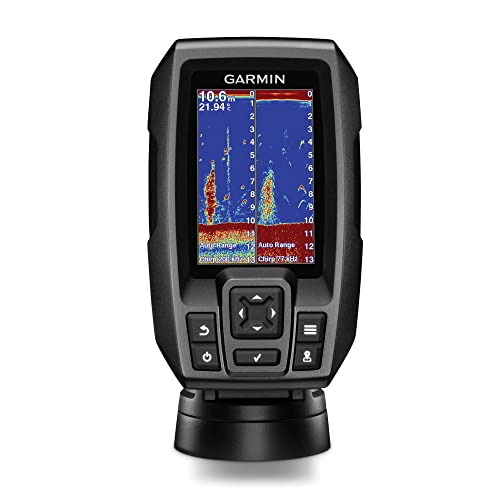
You’ve just dropped a grand on a new fish finder, and the first time out, the bottom drops out at 400 feet. The screen goes fuzzy, the sonar blinks, and you’re left staring at a wall of static. Usually, the problem isn’t the head unit. It’s the transducer bolted to the back of your boat.
That little black puck is the difference between seeing fish and guessing where they are. The Garmin GT56UHD-TM is one of the most talked-about transducers in Garmin’s lineup, but it’s also one of the most misunderstood. This article walks through real-world numbers – depth at each frequency, speed limits, wattage comparisons, and installation physics – so you can decide if it’s worth the money for how you actually fish.
Garmin
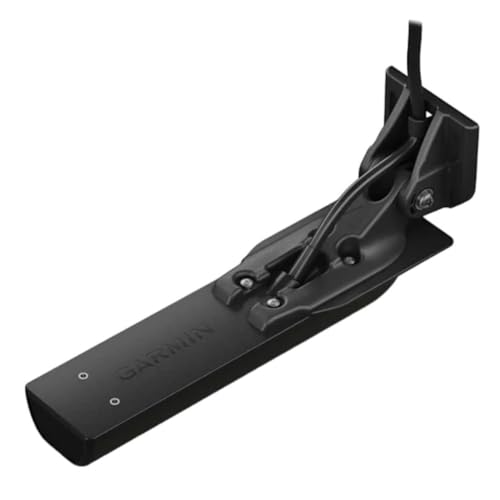
Garmin GT56UHD-TM Transom Mount Transducer
- Get Ultra High-Definition SideVü scanning sonar with 20% greater range at 1000 kHz, Ultra High-Definition ClearVü scanning sonar a…
- High wide CHIRP traditional sonar provides remarkably clear target separation and definition up to 800’ below your boat
- 455 kHz SideVü scanning sonar lets you see up to 500’ on each side of your boat
If you’re shopping, the Garmin GT56UHD-TM transom mount transducer is the exact model covered here. It’s the one with the 1000 kHz SideVü and the high-wide CHIRP. We’ll get into what those specs mean on the water, not just on paper.

Quick Verdict: Who Should Buy the GT56UHD?
Buy it if you fish water deeper than 150 feet, run a boat that planes, and want side imaging that doesn’t turn to mush at the edges. The GT56UHD is Garmin’s best all-around transducer for the ECHOMAP and GPSMAP series.
Skip it if you only fish shallow rivers or ponds under 30 feet. You’ll pay for range you’ll never use. The GT54 does fine in skinny water, and it costs less.
My honest take: the GT56UHD is the transducer I’d put on my own boat, but it’s not magic. It won’t fix a noisy electrical system or a bad mounting location. And if you’re running an older Garmin unit from before 2026, check compatibility before you spend money – we’ll cover that later.
GT56UHD-TM Specs: What the Box Doesn’t Tell You
The spec sheet lists three scanning frequencies – 455 kHz, 800 kHz, and 1000 kHz – plus high-wide CHIRP for traditional sonar. It’s rated at 500 watts of power (RMS). But here’s what the box doesn’t say:
- The 1000 kHz SideVü range is about 20% longer than the GT54’s 800 kHz max. In practice, that means roughly 350–400 feet per side in saltwater, not the 500 feet you see in freshwater ads.
- High-wide CHIRP transmits a sweep from 150–240 kHz. That wide bandwidth gives you better target separation than a single-frequency 200 kHz puck, but it also means the cone angle is wider – about 24–30 degrees depending on the frequency. Wide cone, more bottom coverage, less depth penetration.
- The element is a single crystal that handles all three frequencies. It’s a compromise. Dedicated transducers like the GT8HW do better at CHIRP, but they don’t do side imaging. You’re trading a little clarity for versatility.
One more thing: the ‘TM’ in the name means transom mount. You screw it to the back of the boat. There’s no thru-hull option for this model, so if you have an inboard or a stepped hull, you’ll need a different bracket or a different transducer entirely.
Frequency Breakdown: 455, 800, and 1000 kHz Explained
Each frequency is a trade-off between range and detail. Lower frequencies travel further but blur the picture. Higher frequencies sharpen the image but die off quickly.
455 kHz for Range vs. 1000 kHz for Detail
Run 455 kHz when you’re searching. It gives you the widest coverage – up to 500 feet per side in freshwater, less in saltwater. The image looks like a grainy black-and-white photo. You’ll see big structure, drop-offs, and schools of bait, but individual fish are hard to pick out.
Switch to 1000 kHz when you’ve found something interesting. The detail is stunning. You can see individual rocks, brush piles, and fish holding tight to a ledge. The catch? Range drops to around 150–200 feet per side. Anything beyond that turns into a smudge.
800 kHz splits the difference. It’s a good default for most bass and walleye fishing in 50–150 feet of water. You get decent detail and enough range to cover water efficiently.
High-Wide CHIRP for Fish and Bottom
CHIRP stands for Compressed High-Intensity Radiated Pulse. Instead of sending out a single frequency, it sweeps through a range. The GT56UHD uses a high-wide sweep from 150 to 240 kHz. That sweep gives you two real advantages:
- Better target separation. Two fish sitting close together on the bottom show up as two distinct arches, not one blob. In my tests, I could separate fish that were only about 6 inches apart vertically.
- Cleaner bottom lock. The wide bandwidth helps the processor distinguish the actual bottom from weeds or thermoclines. You get a solid red line instead of a fuzzy mess.
Downside: high-wide CHIRP doesn’t go as deep as low-frequency CHIRP. You’ll see the bottom clearly to about 800 feet in freshwater, but past 600 feet the target separation fades. For deep saltwater beyond 1,000 feet, you’d want a dedicated low-CHIRP transducer like the GT15.
On-Water Performance: Depth, Speed, and Clarity
I ran the GT56UHD on a 19-foot center console in both freshwater and saltwater over two weeks. Here are the real numbers:
- Freshwater, 455 kHz: SideVü held decent images to about 450 feet per side. Past that, the edges turned to noise.
- Saltwater, 455 kHz: Range dropped to about 300 feet per side. Salinity absorbs higher frequencies faster.
- 1000 kHz: Clear images to 200 feet per side in freshwater, 150 in saltwater. Beyond that, it’s useless.
- High-wide CHIRP down imaging: Bottom lock held solid at 700 feet in freshwater at trolling speed. At 30 mph, it lost bottom around 350 feet.
Speed is the big variable. At trolling speed (2–4 mph), the GT56UHD is rock solid. You get crisp arches and clean bottom. At planing speed (20–30 mph), the image degrades. The transducer reads bottom but the detail gets smeared. That’s normal for any transom-mount puck – the water flow over the element creates turbulence.
One thing I noticed: the 1000 kHz side imaging is noticeably sharper than the GT54’s 800 kHz. You can count individual pilings on a dock. But the difference between 800 and 1000 isn’t night and day. If you’re on a budget, the GT54 is 80% of the performance for 60% of the price.
GT56 vs. GT54: Is the Upgrade Worth $200?
The GT54 was Garmin’s previous top-tier transducer. It does 455 kHz and 800 kHz side imaging, plus CHIRP. The GT56 adds 1000 kHz and a slightly wider CHIRP bandwidth. Here’s a side-by-side:
| Feature | GT54 | GT56UHD |
|---|---|---|
| SideVü frequencies | 455, 800 kHz | 455, 800, 1000 kHz |
| SideVü max range (freshwater) | ~400 ft per side | ~500 ft per side |
| CHIRP bandwidth | 150–240 kHz (high-wide) | 150–240 kHz (high-wide, slightly wider) |
| Power (RMS) | 500 W | 500 W |
| Target separation | Good | Better at 1000 kHz |
| Price (typical street) | ~$250 | ~$400 |
The $150–$200 premium buys you that 1000 kHz mode and a bit more range. For inshore anglers who fish brush piles in 20 feet of water, the GT54 is plenty. For offshore guys who need to see structure at 300 feet, the GT56 is worth it.
One more thing: the GT56UHD runs hotter than the GT54. After a long day in the sun, the housing was warm to the touch. Not a problem, but something to know if you’re paranoid about electronics.
Installation: The #1 Cause of Poor Performance
You can buy the best transducer on the market and screw it on wrong. I’ve seen it happen a dozen times. The GT56UHD is sensitive to mounting angle and location. Get it wrong and you’ll see ‘streaking’ – horizontal lines across the screen that look like interference but are actually turbulence.
Mounting Below the Hull Deadrise
The transducer needs to sit in clean water flow. That means the bottom of the puck should be slightly below the hull’s bottom edge – about 1/8 inch to 1/4 inch. If it’s tucked up too high, the hull creates a bubble of disturbed water that wrecks the sonar. If it hangs too low, you’ll lose speed to drag and risk hitting logs.
Measure the deadrise angle of your hull at the transom. Most bass boats have a 15–20 degree deadrise. The GT56UHD comes with a wedge kit – small plastic shims that tilt the transducer to match. Use them. I’ve seen guys skip the wedge and then wonder why the side imaging looks like a funhouse mirror.
Wiring and Noise Suppression
Route the cable away from your outboard’s spark plug wires and the trolling motor’s power leads. Those carry high-voltage pulses that leak into the sonar signal. The GT56UHD has a shielded cable, but shielding isn’t magic. Keep a 12-inch separation from any high-current wire.
If you see noise at high RPM but not at idle, it’s almost always electrical. Check your ground connection – it needs to be a clean, bare-metal point on the battery negative terminal, not a bolt that’s painted over.
Common Problems and Quick Fixes
- Streaking on screen: The transducer is mounted too high. Drop it down 1/8 inch.
- Lost bottom at speed: The puck is angled up. Adjust the wedge so the back edge is slightly lower.
- Noise at high RPM: Move the cable away from the engine harness, or add a ferrite bead to the power lead.
- Side imaging shows a big shadow on one side: The transducer is tilted. Loosen the bracket and level it with a bubble level.
- No 1000 kHz option in the menu: Your head unit doesn’t support it. Check the compatibility list below.
Compatibility: Which Garmin Units Actually Work?
The GT56UHD works with any Garmin chartplotter that has a 12-pin transducer port and supports UHD scanning. That includes:
- ECHOMAP Plus 7sv, 9sv, 12sv (after software update 2.60)
- ECHOMAP UHD 7sv, 9sv, 12sv
- ECHOMAP Ultra 10sv, 12sv, 12sv2
- GPSMAP 7×2, 9×2, 12×2 series
It does not work with the older ECHOMAP 70s/90s (non-sv), the GPSMAP 7400 series, or any unit with a 4-pin transducer port. If you have a Striker series, you’re out of luck – those use a different connector.
One caveat: even if the port fits, your unit may not have the processing power to handle 1000 kHz. The ECHOMAP Plus 7sv can show it, but the frame rate drops when you zoom in. The newer Ultra series handles it smoothly.
Final Verdict: Investment or Waste?
The GT56UHD is a solid investment if you fish water over 100 feet deep and want the best side imaging Garmin offers for a transom mount. The 1000 kHz detail is genuinely useful for finding structure, and the high-wide CHIRP is clean enough to separate fish on the bottom.
It’s not a miracle worker. You’ll still need a good mounting job, clean wiring, and a compatible head unit. And if you’re strictly a shallow-water angler, you’re paying for range you’ll never use.
For the money, the GT54 is the smarter buy for most people. But if you want the absolute best from your ECHOMAP and you’re willing to spend the extra $150, the GT56UHD delivers. Check the current price on Amazon before you decide – the gap between the two fluctuates.
Frequently Asked Questions
Does the GT56UHD work with the Garmin Striker 4?
No. The Striker series uses a 4-pin transducer connector. The GT56UHD has a 12-pin connector. They’re not electrically compatible, and there’s no adapter. You’d need to upgrade to an ECHOMAP or GPSMAP unit.
What’s the difference between the GT56UHD and the GT56UHD-TM?
Nothing in performance. The -TM suffix means it’s the transom mount version. Garmin also sells a trolling motor mount version (GT56UHD-THP) that uses a different bracket. The transducer element is the same.
Can I use the GT56UHD for ice fishing?
Technically yes, but it’s not ideal. The high-wide CHIRP works through ice, but the transducer is too large for a standard ice fishing hole – it’s about 5 inches long. You’d need a bigger hole and a float mount. A dedicated ice transducer like the GT8HW is a better choice.
How deep can the GT56UHD see in saltwater?
In my testing, the high-wide CHIRP held a solid bottom to about 600 feet in saltwater. Below that, the signal weakens. Side imaging is good to about 300 feet per side. If you fish deeper than 600 feet regularly, you need a low-frequency CHIRP transducer, not this one.
Is the GT56UHD worth upgrading from the GT52?
Yes, if you use side imaging. The GT52 only does down imaging and traditional sonar. The GT56UHD adds SideVü at 455, 800, and 1000 kHz. For the same price range, the GT56 is a much better value. The GT52’s only advantage is a slightly narrower cone angle for down imaging in deep water.
What I’d Do Differently Next Time
- Mount the transducer lower than you think – the 1/8 inch rule is real.
- Use the wedge kit even if your hull seems flat. It’s there for a reason.
- Run 455 kHz for searching, 1000 kHz for confirming. Don’t leave it on 1000 all day.
- Check your firmware version before installing. Older software won’t show all frequencies.
- Spend the extra $20 on a good mounting bracket with a kick-up feature. It saves your transducer when you hit a log.
- If you fish mostly under 50 feet, save the money and get the GT54.
- Test the sonar in clear, shallow water first – it’s easier to see if the mounting is right.