
You just bolted a Lowrance Elite 9 TI to your console, fired it up, and the bottom reading looks like a blob of static. The unit works fine, but the transducer you grabbed from your old boat doesn’t talk to it properly. Or worse, you bought a fancy 3-in-1 without checking the connector and now you’re staring at a cable that doesn’t fit any port on the back.
This situation is more common than most anglers admit. The Elite 9 TI is a capable unit, but it has quirks. Its port layout, power output, and firmware requirements trip up plenty of people. I’ll walk you through what actually connects, what performs well, and what to avoid so you don’t waste money on the wrong gear.

Lowrance
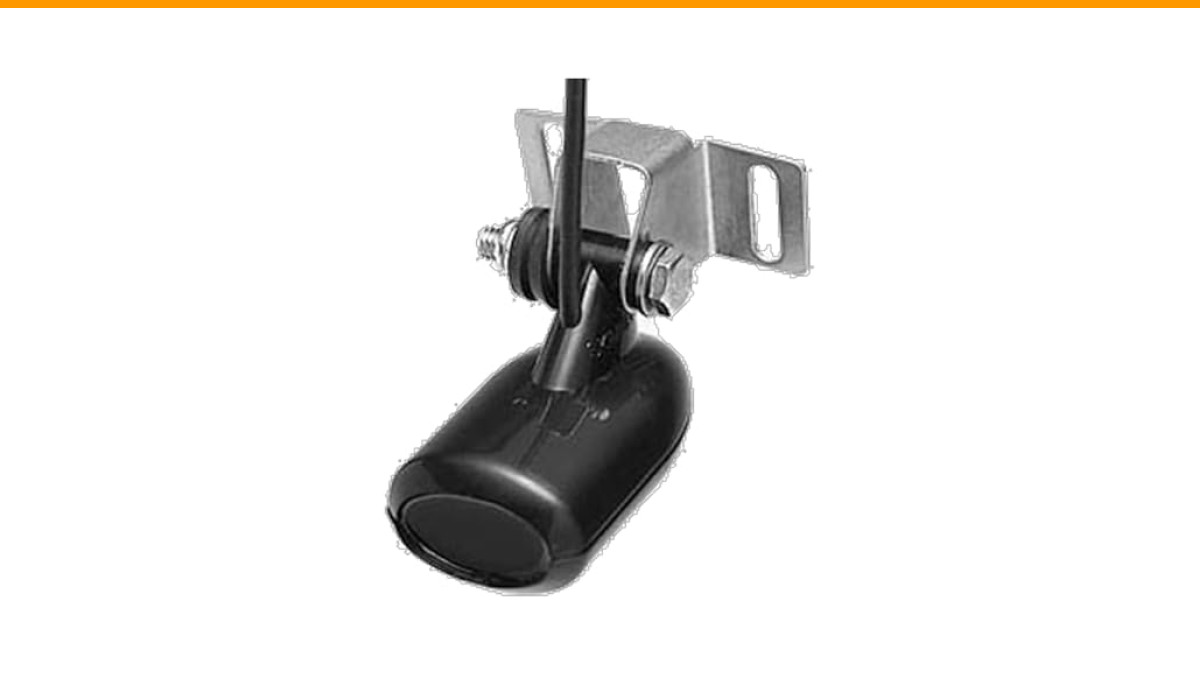
Lowrance High-Speed 9-Pin Transom-Mount Skimmer Transducer, 83/200 kHz Chirp, Depth & Temperature Tracking, 000-14884-001
- Dual 83/200 kHz CHIRP Frequencies: deliver clear, detailed sonar imaging so you can easily locate fish and underwater structures
- High-Speed Skimmer Performance: ensures consistent, accurate readings even when traveling quickly across the water
- Depth & Temperature Tracking: keeps you aware of underwater conditions for smarter, more informed fishing decisions
One quick fix for many owners is the Lowrance High-Speed 9-Pin Transom-Mount Skimmer Transducer. It’s a solid drop-in replacement for the stock HDI unit, giving you 83/200 kHz CHIRP plus depth and temperature readings. It connects straight to the 9-pin port with no adapter fuss.
Why the Elite 9 TI Demands Specific Transducer Choices
The Elite 9 TI is not an HDS Carbon. It lacks the extra Ethernet ports and the higher-power sonar circuitry of its bigger siblings. That difference matters more than most spec sheets show.
First, the unit has one Sonar port and one Ethernet port on the back. That sounds obvious, but many anglers assume they can plug a TotalScan into the Sonar port and an Active Imaging into the Ethernet port simultaneously. You can’t. The Ethernet port is for networking with other units or a SonicHub, not for transducers.
Second, the Elite 9 TI’s internal sonar pushes about 500 watts RMS. That’s plenty for standard CHIRP and DownScan, but it’s not enough to drive ActiveTarget live sonar without an extra power box and a separate display connection. The physical cable might fit, but the unit cannot power the transducer properly.
So the real question isn’t just “which transducer fits” but “which transducer will the Elite 9 TI actually run well.” Those are two different lists.
The 4 Transducer Types That Actually Fit the Elite 9 TI
You have four realistic paths here. Each serves a different fishing style, and each has a trade-off worth knowing before you buy.
TotalScan – The All-Rounder
The TotalScan transducer gives you SideScan, DownScan, and standard 2D CHIRP in one housing. It plugs directly into the 9-pin Sonar port on the Elite 9 TI. No adapter needed.
It’s the best single-transducer setup for most people. You get side imaging out to about 300 feet each side, and the 2D sonar is crisp at typical trolling speeds. The downside is size. It’s a bulky skimmer that sticks out behind the transom, and it can spray water at high speeds if you mount it too low.
One thing I’ve noticed: the TotalScan’s SideScan image is slightly noisier than the dedicated Active Imaging transducer, but for an all-in-one unit on a 9-inch screen, it’s hard to beat.
Active Imaging 3-in-1 – Best for Structure
The Active Imaging 3-in-1 (sometimes called the AI 3-in-1) is the newer version of the TotalScan. It uses the same 9-pin connector, so it drops right onto the Elite 9 TI.
What’s different? The SideScan and DownScan clarity is noticeably better. The CHIRP sonar is also sharper, especially in deeper water. If you spend most of your time fishing ledges, brush piles, or standing timber, this transducer shows you more detail per pass.
The catch is price. It costs more than a TotalScan, and you’re paying for image quality you might not fully see on a 9-inch screen unless you run the unit in split-screen mode. That’s not a knock on the transducer—it’s just the reality of screen real estate.
HDI Skimmer – Budget Depth Workhorse
The HDI skimmer (like the related product mentioned earlier) is the no-frills option. It gives you 83/200 kHz CHIRP plus DownScan, but no SideScan. It’s the same style that ships with many Elite units.
For a kayak or a small jon boat, this is often all you need. The 200 kHz beam gives you a tight cone for bottom detail, and the 83 kHz beam spreads out for fish arches in shallow water. The high-speed skimmer design keeps the reading stable even when you’re running 30 mph to a new spot.
It’s not flashy, but it’s reliable. And if you’re replacing a broken stock unit, this is the cheapest way to get back on the water without changing your mounting holes.
ActiveTarget 2 – Live Sonar (With Caveats)
Live sonar is the hot topic these days, and the Elite 9 TI can work with ActiveTarget 2, but only with serious caveats.
First, you need the ActiveTarget 2 Black Box. The Elite 9 TI cannot power the transducer directly from its Sonar port. The black box handles the power and processing, then sends the video signal to the unit via Ethernet.
Second, you lose the ability to network that Ethernet port to anything else. If you wanted to share waypoints with a second unit, that’s gone. You’re dedicating the port to live sonar.
Third, the Elite 9 TI’s processor is older. It runs ActiveTarget 2, but the refresh rate is not as smooth as on an HDS Pro or a Carbon. It’s usable, but don’t expect flagship performance. If live sonar is your primary technique, save up for a newer unit instead.
Ports, Cables, and Adapters: What Connects Where
Let’s settle the wiring confusion once and for all.
The Elite 9 TI has three relevant connections on the back: a 9-pin Sonar port, an Ethernet port, and a power/data cable port. That’s it. There is no second Sonar port, no NMEA 2026 port on the back (you need a T-connector on the power cable for NMEA), and no dedicated transducer port for Active Imaging.
Here’s the practical breakdown:
- TotalScan, Active Imaging 3-in-1, HDI, and the standard 83/200 skimmer all use the 9-pin Sonar port.
- ActiveTarget 2 connects via the Ethernet port, but only through its black box.
- You cannot run two transducers simultaneously unless one is connected through a Y-cable, and even then, only certain pairs work without cross-talk.
Cable length is another hidden issue. Most transducers come with a 20-foot cable. If your unit is mounted at the console and your transducer is at the transom, 20 feet is usually enough. But if you have a longer boat or you route the cable through a rigging tube, you’ll need an extension. Lowrance sells a 9-pin extension cable, but it’s easy to overlook when ordering.
One more thing: the 9-pin connector looks identical to the older 7-pin blue connector, but they are not interchangeable. Double-check the pin count before you buy any used transducer.
Power and Performance: Why Some Transducers Underperform
People assume all CHIRP transducers perform the same on any unit. That’s false.
The Elite 9 TI puts out about 500 watts RMS. A TotalScan and an HDI both work fine at that power level. But if you connect a transducer designed for a higher-power unit—like the Active Imaging HD transducer that comes with HDS Pro systems—you’ll see dimmer returns and weaker bottom lock. The transducer can handle more power, but the unit can’t give it.
That doesn’t mean the transducer is broken. It means the signal-to-noise ratio suffers. You’ll still see fish, but the arches will be fainter, and the DownScan will look washed out at deeper depths.
So what’s the sweet spot? Stick to transducers rated for 500-watt units. TotalScan, Active Imaging 3-in-1, and HDI all fall in that range. They’re designed to work with the Elite series, and they do.
Avoiding Cross-Talk: Running Two Transducers Cleanly
Say you want to run a side-imaging transducer off the back and a live sonar transducer on the trolling motor. That’s a common setup, but it invites cross-talk.
Cross-talk happens when one transducer picks up the ping from another. You’ll see it as vertical lines or random noise on the screen, especially at the same frequency. It’s annoying and sometimes makes the image unusable.
Here’s how to minimize it on the Elite 9 TI:
- Use different frequencies for each transducer. If one runs 200 kHz, set the other to 83 kHz or CHIRP. The wider the gap, the less interference.
- Keep the transducers physically separated. At least 3 feet of horizontal distance helps. On a bass boat, that usually means one on the transom and one on the trolling motor shaft—that’s naturally far enough.
- Turn off SideScan when you’re not using it. SideScan pings at a wide angle, and it’s the biggest source of cross-talk with a second transducer.
- Update the unit’s software. Some early Elite 9 TI firmware versions had worse cross-talk filtering. The latest updates handle it much better.
If you still see noise after all that, try lowering the ping speed on one unit. It reduces the overlap window.
Used Transducers and Aftermarket Risks You Must Avoid
The used market is tempting. A TotalScan for half price sounds great, but there are traps specific to the Elite 9 TI.
First, counterfeit transducers are real. They show up on auction sites with the Lowrance logo but have cheaper internals. The image quality is poor, and some don’t even read depth correctly. Look for the model number stamped on the cable near the connector. If it’s missing or looks laser-etched rather than molded, walk away.
Second, check the cable condition. A transducer with a cut or kinked cable near the connector is a gamble. The wires inside are thin, and a break is hard to repair. You’ll end up chasing intermittent signals that drive you crazy.
Third, verify the pin count. Older Lowrance units used a 7-pin connector. The Elite 9 TI uses 9 pins. A used transducer from an HDS-7 Gen1 won’t fit without an adapter, and even then, the adapter often loses the temperature reading.
Fourth, ask about firmware. Some older Active Imaging transducers shipped before a certain date require a firmware update on the unit to work. If the seller doesn’t know the age, assume you’ll need to update.
My rule: buy used only from a seller who can send a photo of the transducer plugged into a working unit. Otherwise, pay the extra money for new.
Firmware Updates: The Silent Compatibility Killer
You bought a brand-new Active Imaging 3-in-1, plugged it in, and the unit says “No Transducer Detected.” The cable is seated, the pins are clean, and yet nothing.
Check the firmware version. Lowrance has updated the Elite 9 TI’s software multiple times, and some updates added support for newer transducers. If your unit is running version 1.0 or 2.0 from 2026, it won’t recognize an Active Imaging 3-in-1 that shipped in 2026.
Updating is straightforward. Download the update file from Lowrance’s website to a microSD card, insert it into the unit, and follow the on-screen prompts. It takes about 10 minutes. Do this before you tear apart your boat looking for a wiring issue.
Also, some transducers have their own firmware that updates through the unit. The Elite 9 TI handles this automatically when you connect a compatible transducer and power on. Just give it a minute before you start scrolling menus.
Final Verdict: The Best Setup for Your Fishing Style
There’s no single “best” transducer for the Elite 9 TI because your fishing style changes the answer. Here’s how I’d break it down:
- If you fish mostly structure and want the clearest side imaging, get the Active Imaging 3-in-1. It’s worth the extra money.
- If you fish open water and just need reliable depth and fish arches, stick with the HDI skimmer. Simple and effective.
- If you want one transducer that does everything well without breaking the bank, the TotalScan is your pick.
- If you’re dead-set on live sonar, plan for the ActiveTarget 2 black box and accept the older screen refresh rate.
- Always update your unit’s firmware before installing any new transducer.
- Measure your cable run before buying an extension. A 20-foot cable doesn’t fit every boat.
- Buy new or verify the seller’s setup if buying used. Counterfeits and damaged cables aren’t worth the savings.
The Elite 9 TI is a solid unit, but it rewards careful planning. Match the transducer to the unit’s power and ports, and you’ll get years of clean readings. Rush the decision, and you’ll be back on the forums asking why your screen looks like static. Take the extra 20 minutes to check compatibility before you order.
